Water is most of your beer, and its minerals shape how the malt and hops come across: sulfate makes hops taste drier and sharper, chloride makes malt feel rounder and fuller, and bicarbonate pulls the mash pH up. Two brewers with the same recipe and different tap water can make noticeably different beers. Water Chemistry lets you adjust your water for each recipe without a separate spreadsheet.
Who Water Chemistry is for
It’s for homebrewers taking their first steps with brewing salts who want clear suggestions instead of formulas, and for nano and small breweries that brew different styles from the same water supply and need repeatable adjustments.
How to plan your brewing water in Foambyte
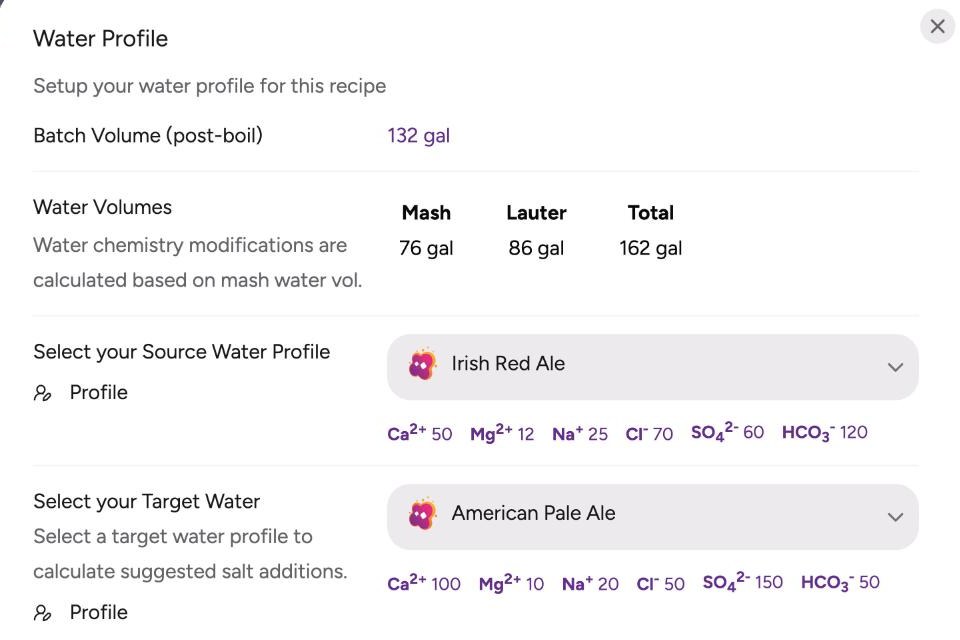
- Open the water window in Recipe Studio. It shows the mash, lauter and total water volumes for the recipe’s batch size.
- Choose your source water. Select the water profile that matches your water report, or one you saved in your brewing profiles.
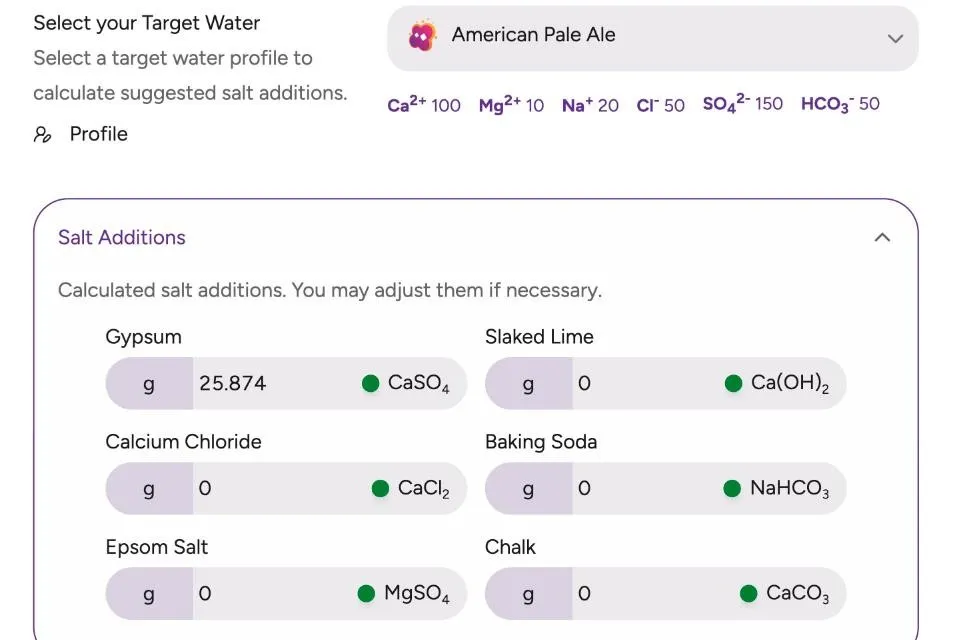
- Choose a target. Pick a target profile for the beer you’re brewing. Its calcium, magnesium, sodium, chloride, sulfate and bicarbonate appear right below it.
- Review the salt additions. Foambyte calculates the amount of each salt for your mash water; adjust any of them if you prefer.
- Check the result. The water modification table shows each mineral going from your water to the adjusted water, with a dot that tells you whether it matches the target.
What you can do with Water Chemistry
- Calculate salt additions automatically. Gypsum, calcium chloride, Epsom salt, slaked lime, baking soda and chalk, in grams for your mash.
- Start from a style. Choose from more than a hundred target profiles, many named after the beer they suit.
- Save your own water. Store your tap water, your well water or your favorite target as water profiles and reuse them in every recipe.
- See every mineral change. Calcium, magnesium, sodium, chloride, sulfate and bicarbonate, before and after the additions.
- Keep the wort pH in view. Recipe Studio shows the estimated wort pH among the recipe’s vitals.
A worked example: hoppier water for a pale ale
Take soft-to-moderate source water with 50 ppm calcium, 60 ppm sulfate and 70 ppm chloride, and an American Pale Ale target with 100 ppm calcium, 150 ppm sulfate and 50 ppm chloride. For a large batch with 76 gal (288 L) of mash water, Foambyte suggests about 26 g of gypsum. That raises the calcium and sulfate while leaving the chloride where it was, which pushes the sulfate-to-chloride ratio towards the dry, crisp hop character the style is known for.
To check one addition by hand, the brewing water salts calculator uses the same chemistry, and the residual alkalinity calculator and mash pH calculator show how the water will affect the mash.
Water Chemistry and the rest of Foambyte
Water profiles live in your brewing profiles, so you set them up once and use them in every recipe in Recipe Studio. When a recipe becomes a batch, its water settings come with it, and they appear in the recipe summary next to the ingredients and mash.
Plan your brewing water for free and brew with the water your beer needs.